
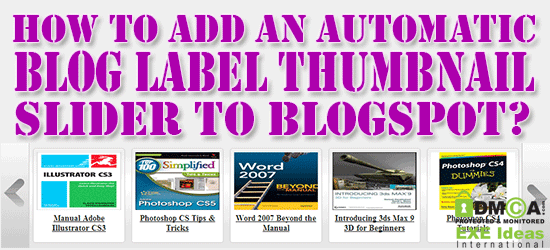
There are many features added in this slider and all of those are very useful and needed. Like you don’t have to update this slider after your every new post, it will automatically fetch your latest post from your RSS And will add it to his slider. These post will be shown as thumbnail and the title only that are ok to attach a visitor to click on it and to open it.
From this you can also increase your SEO too like it will help  you to decrease your bounce rate and also will increase your page-views and time on site count. You can engage your visitor in your awesome posted and it will also change your template style into awesome.

Features:
1.) Awesome And Stylish Design.2.) Speed Up Loading Time.
3.) Quick To Install And Easy To Use.
4.) SEO Friendly.
5.) Will Decrease Your Bounce Rate.
6.) Engage Your Readers In Your Awesome Articles.
7.) Based Upon Carousel Slider Code.
8.) J-Query 1.7.2 Added.
9.) Contain HTML-CSS-JavaScript-JQuery-Images Only.
10.) Automatically Fetch Latest Posts From Your Desired Label.
11.) You Can Control Your Post Count Easily.
12.) Automatic Slides After Your Desired Time.
13.) Visitor Can Also Move Your Post Manually Through Buttons.
14.) It Will Show Post Top Image Thumbnail And Post Title.
15.) You Can Customized It’s Design Via Easy CSS.
16.) You Can Also Change JQuery Code According To Your Desire.
17.) It Will Remain Sliding Between Your Allowed Latest Post From Label.
18.) You Can Add It Anywhere In Your Template Or Layout.
19.) You Can Bound It To Display On Your Desired Page/Post.(How To Display Gadgets On Your Desire Page/Post In Blogger?)
20.) Short And Easy Codes With A Lot Of Extra Customizations Easily.
How To Add In Blogspot?
1.) Go To Your www.blogger.com2.) Open Your Desire Blog.
3.) Go To “Template“.
4.) Click “Edit HTML“.
5.) Now Click Within Code Box.
6.) Go There Where You Want To Add This Slider.
7.) Now Copy The Below Code And Paste It There.
8.) Click Save, Now You Are Done.
Customization:
1.) Don’t Add J-Query 1.7.2 If You Already Have It.2.) Change https://blogger.googleusercontent.com/img/b/R29vZ2xl/AVvXsEirJwJv-Is3rmY8MiXR5QoVPjUYy5OzQxxWiePNco7WTP3VVNvDwd5r9wE2fk0axrtfjE1DdGlIBfibBkg9x9Hvd-5bhejShXSfICtFi0EFrPv9FqkZzMUErDhcykxMq5UTbhKb2YHYBAM/s1600/no+image.jpg With Your Desired Image To Show Where You Don’t Have Post Image.
3.) Change false To true If You Want To Show Random Image From Your Post As Thumbnail.
4.) Change  true To false Is You Want To Stop Bolding Title Text.
5.) Change 150Â To Your Desired Summary Text Count. (Not Needed)
6.) Change 25 To Your Desired Title Text Count.
7.) Change 10 To Your Desired Post Count To Be Slide.
8.) Change Your Label Name With Your Desired Label Name That’s Post You Want To Show In This Slider.
9.) Change CSS According To Your Desire.
10.) Save and Done…
Sumber : http://www.exeideas.com/